Smart AudioBook Player
- 4.9
- Rating
- 5.00M
- Installs
- Free
- Price

 Analysis by App-foxy
I have always found audiobooks easier to enjoy when the player stays out of the way. A good reading app should remember where I stopped, make long chapters manageable, and let me listen without constantly reaching for the screen. Smart AudioBook Player is built around that practical idea. It is a free Music & Audio app from Books Software, and after using it as a dedicated audiobook player, I found it much more focused than a general music application.
The app is available to everyone, and its long presence on mobile matters here: it was released on October 2, 2011. That gives it the feel of a tool refined around audiobook habits rather than a music player that happens to accept spoken-word files. It has passed five million installs, with a 4.9 average from roughly 199 thousand ratings and about 11 thousand written reviews. Those figures suggest that its focused approach works for a large audience, although popularity alone does not make every choice right for every listener.
How I use it as a dependable audiobook routine
My baseline workflow is simple. I place an audiobook on the device, open it in Smart AudioBook Player, check that the chapters appear in the expected order, and begin listening. From there, the important part is not starting playback; it is returning to the book later without losing the thread. The app is at its best when I treat it as a library for ongoing books rather than as a temporary audio file viewer.
You May Also Like

 Blood Strike: 2.5 Anniversary
Blood Strike’s Loadouts Turn Every Drop Into a Tactical Gamble
A close look at Blood Strike’s custom loadouts: how fast access to signature weapons reshapes its battle royale rhythm, rewards preparation, and narrows the gap between fights.

 Pandora - Music & Podcasts
Pandora’s Music Is Easy to Start, but Harder to Recover
Pandora’s strength is its low-effort path from a seed to a station. Its weak spot is how much confidence it asks you to place in connection, setup, and quiet recovery.

 8 Ball Pool
 Is Built on Rivalries, Rematches, and Routine
A close look at the rivalries, rematches, shared routines, and unanswered safety questions that turn a quick pool match into a persistent mobile community.

 Samsung Music
’s Quiet Strength Is Playing What You Already Own
Its reach comes less from spectacle than from dependable access to a personal library. That simplicity is both the app’s strongest retention engine and its ceiling.

 AccuWeather: Weather Radar
AccuWeather Review: A Quick, Clear Forecast for Everyday Decisions
For everyday plans, the best forecast is the one you can understand quickly. AccuWeather makes rain timing, radar, and local conditions easy to act on, with a few trade-offs.

 Hill Climb Racing
Why Hill Climb Racing Still Turns Crashes Into One More Run
A tiny car, a bumpy hill and one more upgrade: Hill Climb Racing keeps resurfacing because its simple chaos makes every near-miss feel personal.
More From Our News Desk



That distinction is useful if you are moving from a regular music player. Music apps are usually organized around tracks, albums, playlists, and quick skips. Audiobooks need a different mental model. A chapter may last much longer than a song, the narration may be interrupted repeatedly, and the exact stopping point can matter more than the title currently playing. Smart AudioBook Player feels designed for those realities.
For an everyday example, I might listen during a morning commute, pause when I arrive, and continue while cooking in the evening. The value is not a flashy interface; it is the confidence that the book remains easy to resume. When I listen in short sessions, I also pay attention to the chapter title before stopping. That small habit makes it easier to remember where I am, especially with nonfiction books that contain similarly named sections.
I also prefer keeping one or two active books visible in my routine instead of importing a large folder and leaving everything unorganized. A dedicated player becomes more useful when I decide which books are currently in progress, which are finished, and which I may return to later. This is not a replacement for a full digital library manager, but it encourages a cleaner listening habit than a generic file browser.
The first setup can require a little patience. Audiobooks are often stored as multiple files, and the way those files are named or arranged affects how comfortably they can be used. If the chapters appear in an odd order, I would fix the folder or filenames before blaming playback. A few minutes spent organizing the source material saves repeated frustration later.
Settings I would check before settling in
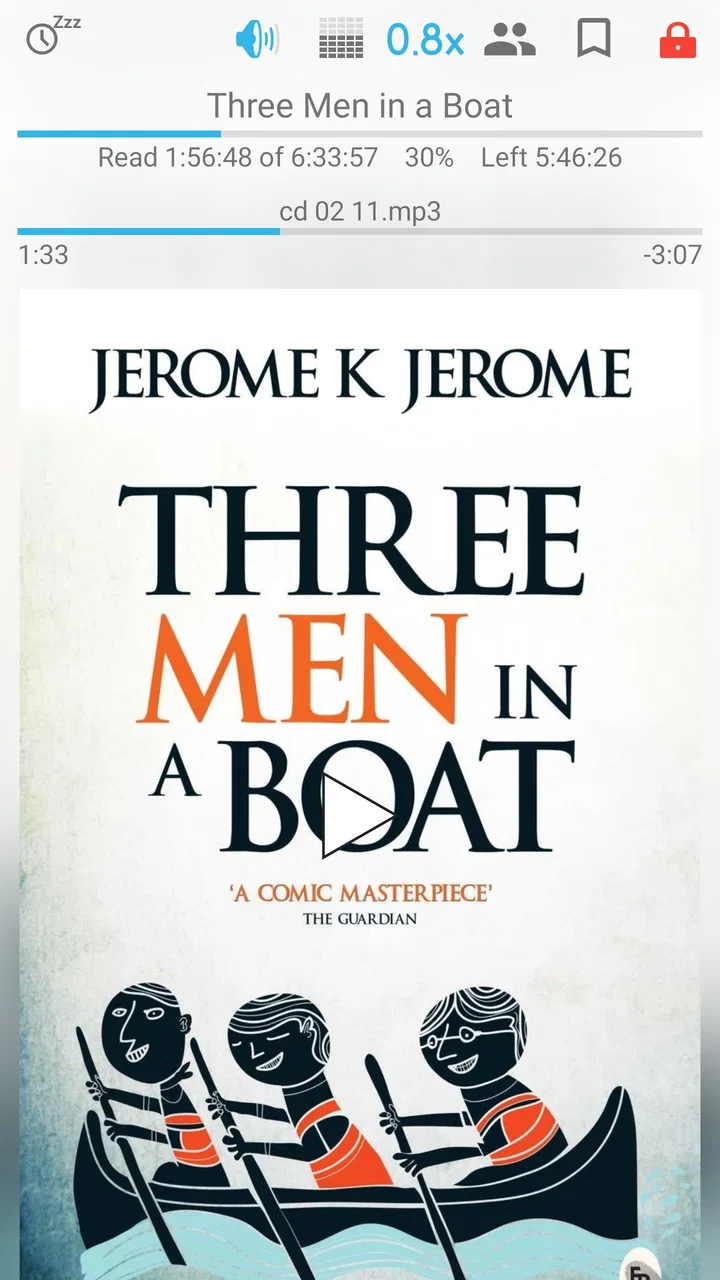
I recommend spending time in the playback settings before beginning a long book. The most important choice is speed. Narration that feels slow at normal playback may become easier to follow with a modest increase, while dense fiction, technical nonfiction, or unfamiliar accents can suffer if the speed is pushed too far. I prefer adjusting gradually and listening for comprehension rather than choosing a speed simply because it shortens the book.
Sleep-related controls are worth checking if you listen in bed. A timer can prevent an audiobook from continuing all night, but I would not rely on it as a substitute for a reliable stopping routine. I usually set a short listening window when I am tired, then stop at a natural chapter break when possible. That combination reduces the chance of waking up unsure how far the narration continued.
Another useful habit is marking meaningful places as I go. A bookmark is more valuable when it has a purpose: a passage I want to revisit, a name I need to remember, or a point in a nonfiction argument that deserves a note elsewhere. Randomly marking every interruption creates clutter. I use bookmarks selectively, especially in books that I expect to discuss or consult again.
Volume behavior deserves attention too. Spoken audio can vary greatly between narrators and recordings. I test the player at a comfortable level before beginning, then avoid making frequent tiny adjustments. If the recording itself has uneven volume, the app cannot completely repair it. In that situation, careful listening with headphones or a stable speaker is more effective than expecting a playback setting to solve every recording problem.
Because this is an audiobook-focused tool, I would also check how it handles the library structure after importing files. A clear folder arrangement is particularly helpful for multi-part books, collections, and recordings with bonus material. I keep supplementary chapters separate when possible, so they do not interrupt the main sequence. This is a small organizational decision, but it makes the player feel much more predictable.
In-app purchases range from $0.99 to $4.99 per item, while the app itself is free. I see that as a reasonable way to try the core experience before deciding whether any optional purchase fits my needs. I would still review the available options inside the app before paying, because the right choice depends on which functions I actually use. Someone listening occasionally may never need anything beyond the basic player.
Shortcuts and repeatable patterns that save attention
The biggest improvement in my listening comes from reducing screen time. I try to start playback before leaving home, place the phone somewhere accessible but not constantly visible, and use the available playback controls rather than opening the library after every pause. This matters more than it sounds: audiobook listening is often done while walking, commuting, cleaning, or exercising, so a workflow that demands visual attention quickly becomes inconvenient.
I also separate two kinds of interruption. If I am stopping for a few minutes, I simply pause and return. If I am ending a session for the day, I make a mental note of the chapter and save a bookmark only when the location is important. Treating every pause as an event creates unnecessary maintenance. Treating every long break casually can make a complicated book harder to resume.
For books with recurring names, arguments, or characters, I use bookmarks as navigation points instead of trying to remember everything. For example, in a history book I might mark the start of a major period; in a novel, I might mark a scene that changes my understanding of a character. This turns the player into a practical reference tool, not just a device for continuous playback.
Playback speed also works best as a pattern rather than a permanent setting. I may listen slightly faster during descriptive passages and return closer to normal speed when the material becomes information-heavy. Constantly changing speed is distracting, so I only do it when the difference in density is obvious. The trade-off is clear: faster listening saves time, but it can reduce retention and enjoyment.
When I switch between listening environments, I make a quick sound check. A quiet room allows more detail, while traffic or household noise may hide softer narration. I would rather choose a comfortable, understandable level than chase maximum loudness. If I find myself replaying sentences because the recording is hard to hear, the problem may be the environment or the source file rather than the app.
One of the more useful advanced habits is keeping the book’s physical organization consistent with the player’s organization. I avoid mixing unrelated audio files into the same audiobook folder. I also use clear names for volumes in a series. This prevents a common problem with local audiobook players: the software can only present the material as clearly as the files allow. Good preparation makes navigation faster every time afterward.
Where the focused design reaches its limits
Smart AudioBook Player is not the best choice for everyone. If most of your listening comes from a streaming subscription, you may prefer an app that combines discovery, purchasing, cloud synchronization, and playback in one ecosystem. A dedicated local player is more appealing when you already have audiobook files and want control over how they are arranged.
It is also less suitable for someone who wants music, podcasts, and audiobooks managed in one universal queue. The focused design is a strength for readers, but it can feel narrow if your listening habits change constantly. A general audio app may be more convenient when you want to jump between many content types without maintaining separate libraries.
Local-file organization can be another friction point. If your collection has inconsistent filenames, missing chapters, or several versions of the same recording, setup may take longer than expected. The player cannot make a disorganized collection feel perfectly tidy without some help from the listener. I consider this a fair trade, but new users should know that the first experience depends partly on how carefully their files are prepared.
I would also avoid assuming that a dedicated audiobook player automatically replaces a backup system. Important bookmarks and listening progress are valuable, especially for long books, but I still keep my original audio files organized elsewhere. A player is part of the workflow, not the entire archive. Anyone who changes phones frequently should think about how they will move both the recordings and the relevant listening information.
Another limitation is personal preference. Some listeners want large artwork, social recommendations, polished discovery pages, or a service that remembers everything across devices. Smart AudioBook Player’s appeal is more practical than decorative. It is about getting through a book comfortably, not turning listening into a browsing experience.
Who will get the most from it
I would recommend it to people who download or keep their own audiobook files, listen to long recordings over several days, and care about returning to the correct place quickly. It is especially useful for commuters, frequent travelers, students using spoken material for revision, and readers who prefer a dedicated tool instead of a crowded entertainment app.
It can also suit families or households where different people listen to different books on the same device, provided each person keeps the library organized. The app’s focused purpose makes it easier to think in terms of books and chapters rather than a mixed stream of songs and clips. That clarity is valuable when the listening session is short and the book is long.
I would suggest skipping it if you mainly want instant access to a large catalog, automatic recommendations, or seamless service-based synchronization. In those cases, a commercial audiobook platform may be a better fit even if its player feels less specialized. The choice depends on whether you value ownership and control of local audio more than convenience inside a subscription ecosystem.
My verdict after building a consistent listening habit
After using Smart AudioBook Player as a regular audiobook tool, I see its main strength clearly: it respects the way people actually consume long spoken recordings. The useful experience comes from combining sensible file organization, comfortable playback settings, selective bookmarks, and a habit of stopping deliberately. None of those choices is dramatic on its own, but together they make a long book easier to finish.
The app is free to start, rated for Everyone, and supported by a large established user base. Books Software has kept the product centered on audiobook playback rather than trying to turn it into an all-purpose media platform. Optional in-app purchases are available from $0.99 to $4.99 per item, so listeners can begin without committing money immediately and decide later whether the extra value matches their routine.
My honest recommendation is strongest for local audiobook listeners who want control and repeatable navigation. I would not choose it simply because it has a high rating; I would choose it because its focused design matches a specific need. If your ideal evening is opening a streaming catalog and choosing something new, another app may feel easier. If your goal is to steadily finish the books already on your device, Smart AudioBook Player is a practical companion that rewards a little organization.
In the end, I judge it less by how many buttons it offers and more by whether it helps me return to a book without friction. With a tidy library, a carefully chosen playback speed, and bookmarks used for real reference points, it becomes a dependable part of my daily routine. That combination of focus and control is the reason I would recommend it to a friend who listens to audiobooks regularly.
FAQs for Smart AudioBook Player
01What is Smart AudioBook Player, and who is it designed for?
Smart AudioBook Player is an Android audiobook player designed for people who prefer listening to downloaded audiobooks rather than streaming them. It organizes books into categories such as new, started, and finished, while allowing you to add cover art, descriptions, and other details. It is especially useful for listeners with large personal audiobook collections and those who want more control than a basic music player provides.
02Does Smart AudioBook Player include audiobooks, or do I need to provide my own files?
The application is primarily a player and library manager, not an audiobook store or subscription service. You generally need to obtain audiobook files legally from another source and then import them into the app. Before downloading, check that your files use a supported audio format and are stored somewhere accessible to the application. Availability and compatibility may vary depending on the Android version and file type.
03What features make Smart AudioBook Player different from a regular audio player?
Smart AudioBook Player is built specifically around audiobook listening. It can remember your playback position, organize books by status, support bookmarks and notes, and offer convenient controls such as playback-speed adjustment and a sleep timer. Many versions also include features for managing multi-part books, tracking progress, and using a headset or lock-screen controls, making long listening sessions easier to manage.
04Can I listen to audiobooks offline with Smart AudioBook Player?
Yes, the app is intended to play audiobook files stored locally on your Android device, so an internet connection is normally not required during playback. This makes it practical for travel, commuting, or areas with weak connectivity. You may still need internet access for activities such as downloading the application, obtaining audiobook files, retrieving optional cover information, or using features that depend on external services.
05Is Smart AudioBook Player free, and are there any limitations to consider?
Smart AudioBook Player may offer a free trial or free version alongside a paid full version, depending on the edition and current store policy. The trial can help you test file compatibility, library organization, and playback controls before purchasing. Pricing, trial duration, and included features can change, so review the official Google Play listing carefully. Also note that the app is generally intended for Android rather than iOS.
Pros
- Playback speed controls help match different listening preferences.
- Bookmarks make it easy to save important chapters or passages.
- Automatic pause after inactivity helps prevent battery and data waste.
- Supports downloading cover art for a more organized personal library.
- Sleep timer can stop playback after a chosen period or chapter.
Cons
- Some useful features may require upgrading from the free version.
- Initial audiobook setup can take time for large or poorly organized libraries.
- The interface may feel dated compared with newer audiobook apps.
- No built-in store means you must obtain audiobook files elsewhere.
- Advanced settings may be confusing for listeners who want a simple setup.

Smart AudioBook Player
Gallery